

Overview
FigJam launched in 2021 as Figma's answer to Miro, and it has one structural advantage no other tool in this directory can claim: your designers already have it open.
Since Figma's 2025 pricing restructure, FigJam is bundled into every seat on every plan. If your company pays for Figma Design, every product manager, engineer, and designer can join a FigJam board without a new account, a new login, or a procurement conversation. For retros, that removes the single most annoying part of adopting a new tool.
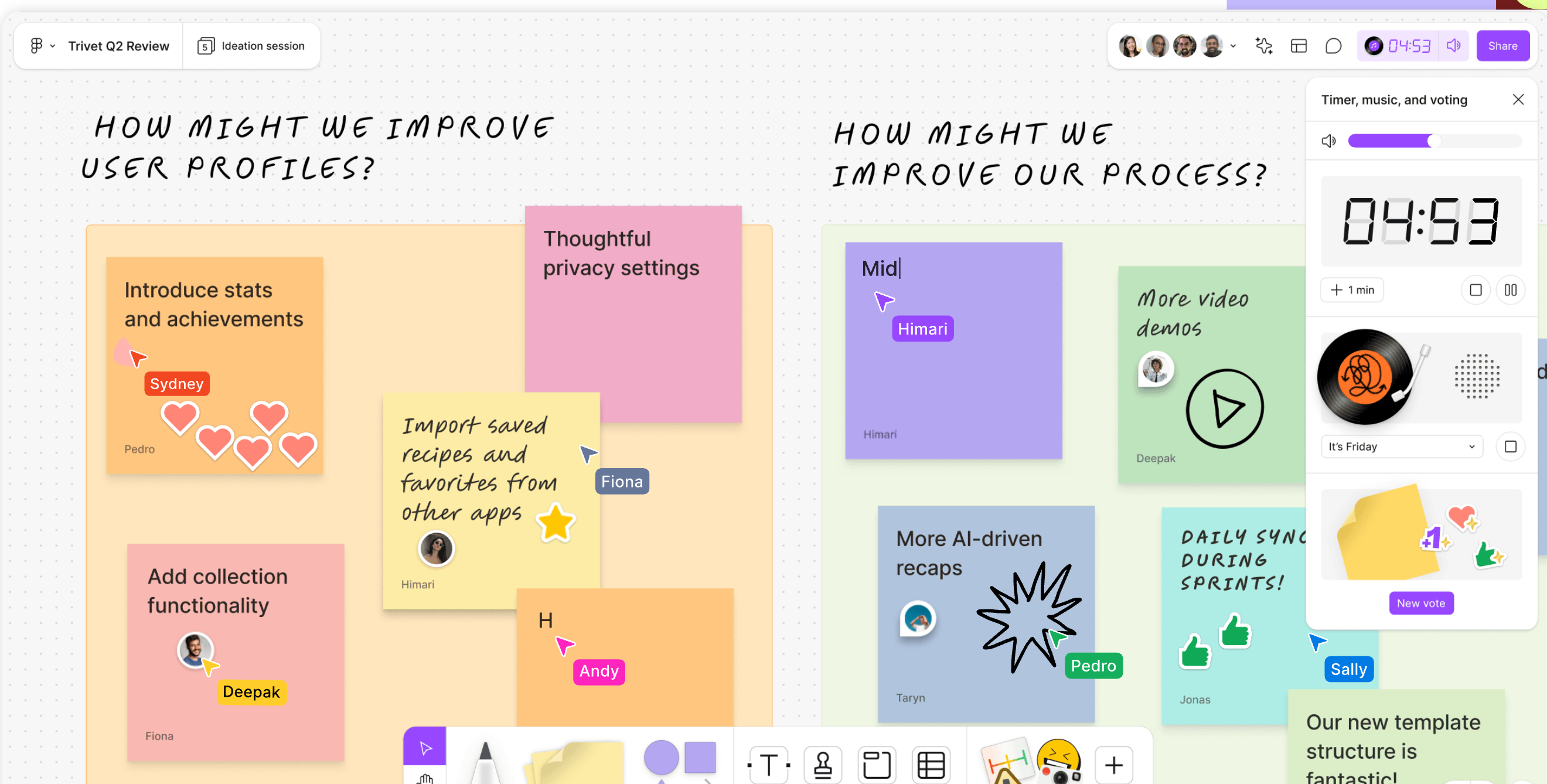
The retro experience itself is a free-form canvas with real facilitation mechanics layered on top. Native voting sessions hide votes until the facilitator ends the round. A timer and a music player sit in the toolbar. Stamps and emotes give quiet participants a way to react without typing. It is closer to a purpose-built retro tool than Miro or MURAL get, while staying a general-purpose whiteboard at heart.
Pros
- Voting, timer, and music are built in, not bolted on through plugins
- AI sorting turns 60 unsorted stickies into themed groups in seconds
- The most fun toolset of any whiteboard: stamps, emotes, washi tape, cursor chat
- A $3/month Collab seat is one of the cheapest paid entries in this directory
Cons
- No true anonymity: sticky authorship can be toggled back on at any time
- No action item tracking, retro history, or team analytics
- Free plan caps you at 3 FigJam files, which recurring retros burn through fast
- No guided facilitation, so the scrum master drives every phase manually
Key Features
Native Voting Sessions
This is the feature that makes FigJam retros actually work. The facilitator starts a voting session, sets a prompt and a votes-per-person limit, and everyone votes by stamping stickies. While the session runs, votes and cursors are hidden, so nobody anchors on what the loudest person picked. End the session and the tally reveals.
You can run several voting rounds in one file, which maps neatly onto a retro: one round to pick discussion topics, another to prioritize action ideas.
One catch: starting a voting session requires a paid team. Participants on free accounts can vote, but the facilitator needs a Professional plan or better.
Timer and Music
A timer lives in the top toolbar next to voting, and there is a built-in music player for the session. Small thing, big difference in energy for remote retros. The timer does not advance any agenda automatically, though. There are no phases in FigJam, so you are the workflow.
FigJam AI
Two AI features earn their keep in retros. "Sort stickies" clusters selected notes into sections by topic, which replaces the tedious manual grouping phase. "Summarize stickies" produces a written recap with key takeaways from whatever you select.
AI actions consume credits. The free plan gets 150 credits per day (up to 500/month), which covers a retro or two. Heavy AI users will need paid seats with larger allotments.
Figma's 2025 Config releases added an AI agent that generates whole FigJam boards from a prompt, so you can type "sailboat retro for a mobile team" and get a usable board. It works, though the pre-made templates are usually better composed.
Templates and the Widget Ecosystem
Hundreds of templates cover Start/Stop/Continue, Mad/Sad/Glad, sailboat, and most other retro formats you would recognize, largely community-contributed. Any board can be saved and reused, and paid teams can publish shared team templates.
The Community widget library fills some gaps: estimation poker decks, extra timers, embeds. Quality varies, and none of it is first-party, so treat widgets as workarounds rather than features. That matters most for planning poker, which FigJam does not do natively.
Jira, GitHub, and Asana Widgets
The Jira widget pulls issues onto the board and creates new ones from it, with changes syncing back to Jira. GitHub and Asana widgets do the equivalent for their trackers, and the Confluence app embeds live boards in pages. Slack and Microsoft Teams apps handle notifications.
No Linear, no Azure DevOps, no Trello. If your tracker is one of those, nothing on the board connects to your backlog.
Pricing
You do not buy FigJam. You buy Figma seats, and FigJam comes along.
- Starter (Free): 3 FigJam files, 3 pages each, unlimited collaborators. Includes voting, timer, music, and templates. 150 AI credits/day.
- Professional: Collab seats at $3/month (annual) unlock unlimited FigJam files plus Slides. Full seats at $16/month add Figma Design.
- Organization: Collab $5/month. Adds SSO/SAML, org-wide admin, private widgets.
- Enterprise: Collab $5/month, Full $90/month. SCIM, audit logs, guest controls.
The Collab seat is the number that matters for retro teams. At $3 to $5 per user per month, a ten-person team runs $30 to $50/month, in the same range as flat-rate tools like Kollabe or Neatro but scaling per head.
The free plan's 3-file cap is the real constraint. A team running one retro per sprint fills it in six weeks. You can reuse a single file and clear it each sprint, but then you lose your history.
Ease of Use
If anyone on the team has touched Figma, onboarding is nearly zero. The canvas, cursor multiplayer, and comment system behave identically. For everyone else, FigJam is still one of the friendlier whiteboards, considerably less intimidating than Miro's toolbar sprawl.
Facilitating takes more skill than using. Because there is no phased workflow, the scrum master builds the agenda out of sections, drives the timer manually, and decides when to start voting. Experienced facilitators will not mind. New ones get no guardrails, which is exactly where a guided tool like Retrium or TeamRetro earns its price.
One honest gap: anonymity. You can hide sticky author names, but the attribution is stored and reversible with the same toggle. If your team needs psychological safety guarantees for spicy feedback, FigJam cannot provide them. Anonymous-by-default tools like Kollabe or EasyRetro can.
Who Is It Best For?
FigJam fits well for:
- Product and design orgs already paying for Figma, where FigJam is effectively free
- Teams that want a playful, high-energy retro with stamps, emotes, and music
- Facilitators who like building their own formats instead of following a wizard
- Workshops that go beyond retros: journey maps, brainstorms, PI planning walls
Look elsewhere if you need:
- Action items with owners and carryover between sprints. Nothing here tracks them. Parabol does this well
- True anonymous feedback. FigJam's is reversible
- Retro analytics or team health trends. Try Echometer or ScatterSpoke
- A free tool for ongoing use. Three files will not last a quarter
The Verdict
FigJam is what happens when a whiteboard company takes meetings seriously: voting, timer, and music are genuinely native, the AI grouping saves real minutes, and no tool in this directory is more fun to be inside for 45 minutes. Among general-purpose canvases, it beats MURAL for retros outright and undercuts Miro on price for teams that only need the whiteboard.
What it never becomes is a system of record for continuous improvement. No action item tracking, no history, no trends, no real anonymity. Run your retro in FigJam and the follow-through lives somewhere else, usually in Jira tickets someone remembered to create.
If Figma is already on your invoices, start there and see how far it carries you. If you are buying a tool specifically for retrospectives, a purpose-built option gives you more for the same money.