

Overview
Miro wasn't built for retrospectives. It was built for visual collaboration, and 100 million users later, that's still what it does best. But here's the thing: the breadth of the platform turns out to be a real advantage for retros, because retros don't happen in a vacuum.
Think about what surrounds a retrospective. Before the retro, your team is grooming a backlog, estimating stories, mapping user flows. After it, action items need to land in Jira, summaries need to reach Confluence or Notion, follow-ups need to surface in Slack. Miro handles all of that in one workspace. No context switching, no copy-pasting between tools, no reconciling action items across platforms. That continuity matters more than any single feature a purpose-built retro tool can offer.
It's not perfect for retros, though. Miro's "private mode" hides cards during brainstorming to prevent anchoring bias, but once revealed, author names are visible. That's not the same as true anonymous feedback in Parabol or EasyRetro. Facilitators manage phase progression themselves instead of relying on guided workflows. Those are real gaps. But the AI capabilities, native planning poker, 160+ integrations, and the practical math of one subscription replacing several tip the balance in Miro's favor.
Pros
- Unmatched ecosystem — one subscription covers retros, workshops, planning poker, design, and more
- 160+ integrations including Jira, GitHub, Linear, Slack, Confluence, and Azure DevOps
- AI-powered clustering, summarization, and action item generation
- Best-in-class cross-platform experience on desktop, web, tablet, and mobile
- Thousands of community-built retrospective templates beyond the built-in library
Cons
- Private mode hides cards during brainstorming, but author names show on reveal — not true anonymous feedback
- Not purpose-built for retros, so facilitators manage phase progression manually
- Per-member pricing can add up for teams that only need a retro tool, and AI features consume limited credits
Key features
Retrospective templates and community library
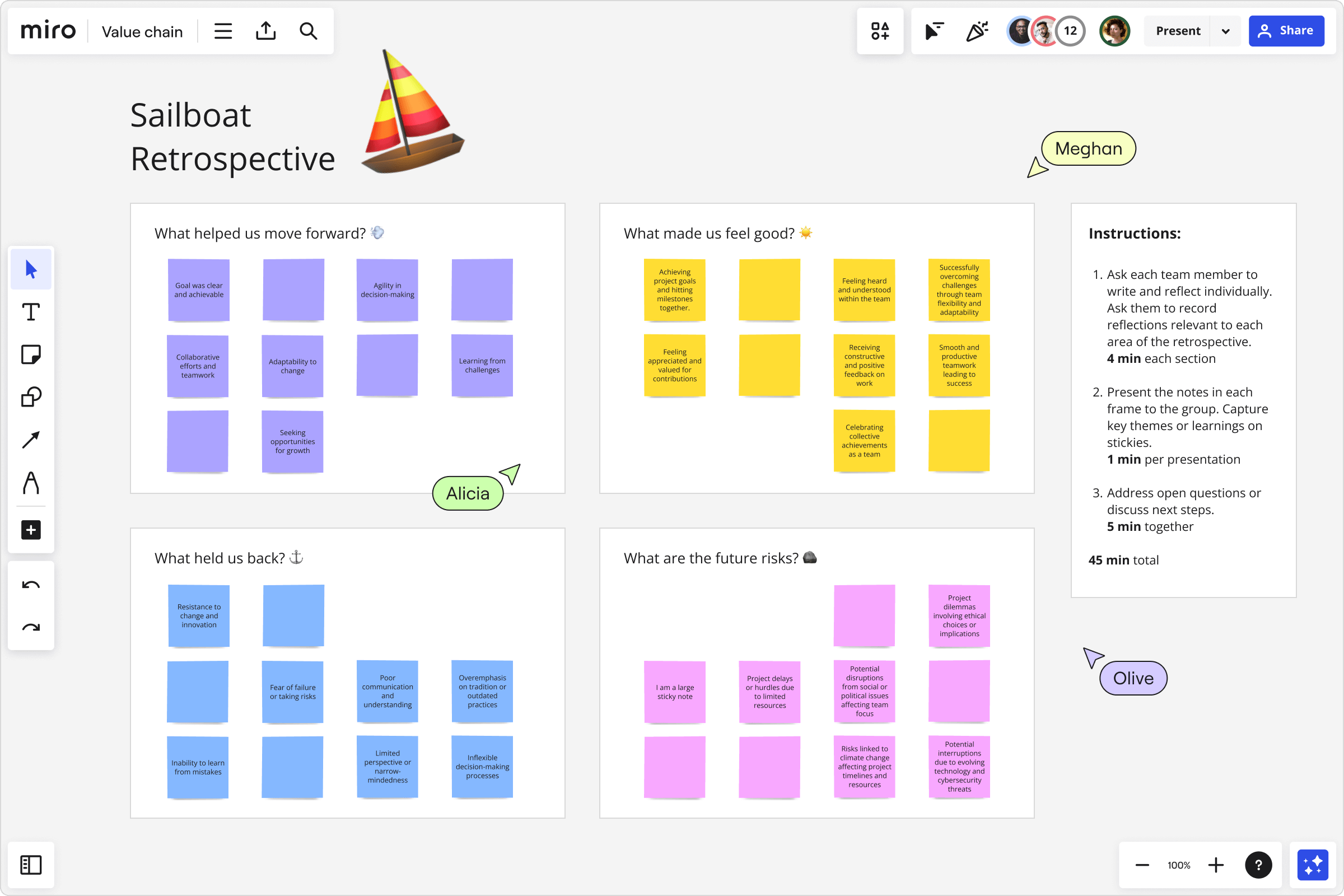
Miro's template library for retros is huge. The built-in collection covers every standard format: Start/Stop/Continue, Mad/Sad/Glad, Sailboat, 4Ls, Starfish, and more. Layouts take advantage of the infinite canvas, which is nice when you want to keep multiple sprint retros side by side.
The community library is where it gets interesting. Over 7,000 user-contributed templates on Miroverse, including retro formats you won't find in dedicated tools, things like energy-level check-ins and quarterly reflection boards. Where Kollabe gives you a curated set of templates, Miro gives you a marketplace. You can customize any template, save your team's preferred format, and reuse it across sprints. If your team has outgrown the basic three-column retro, the variety here is hard to beat.
Miro AI
Miro AI clusters similar sticky notes automatically, generates discussion summaries, and suggests action items based on themes from the retro. If you've ever spent 15 minutes dragging sticky notes into groups while your team checks Slack, you'll appreciate this. The AI does it in seconds.
It also generates content. Facilitators can prompt it to suggest discussion questions for a specific sprint theme, or to rewrite vague feedback into something concrete. Parabol has AI meeting summaries, but Miro's AI goes further because it works across the entire canvas, not just the retro output.
AI features run on a credit system. On the Free plan, 10 credits for the entire team won't last a single retro with a large group. Budget accordingly on Starter and Business too.
160+ integrations
Miro connects natively to Jira, GitHub, GitLab, Linear, Slack, Microsoft Teams, Confluence, Asana, Monday.com, Azure DevOps, Notion, and over 150 others. No dedicated retro tool has anything close to this list.
What does that mean in practice? Action items from a retro flow directly into Jira as assigned tickets without leaving the board. Summaries post to Slack automatically. Sprint data from your project management tool can sit on the board as context before the retro even starts. The result: action items actually make it into the backlog instead of dying on a sticky note nobody looks at again.
Voting, timers, and facilitation tools
Dot voting, countdown timers, and presenter mode are all built in. Voting lets teams prioritize topics. Timers keep phases on track. Presenter mode locks everyone's view to the facilitator's screen during walkthroughs.
Setting these up takes more work than guided tools like EasyRetro, where the flow is pre-built. But experienced scrum masters tend to prefer the flexibility. You can rearrange the retro on the fly, skip phases that aren't relevant, or extend a discussion that's going somewhere useful. A fixed sequence can't do that.
Cross-platform apps
Miro has native apps for desktop (Mac and Windows), iPad, iPhone, and Android, on top of the web app. Most retro tools are web-only.
The tablet experience stands out. Writing sticky notes with a stylus on an iPad actually feels natural, and the touch gestures for moving, grouping, and voting work well. The phone app is usable too, which is more than you can say for most whiteboard tools on mobile. For distributed teams where participants are joining from a mix of devices, this matters.
Native planning poker
Most retro tools don't do estimation. Miro has a built-in Estimation app that runs planning poker on the same board where you hold retros and sprint planning. Votes are anonymous until the facilitator reveals them, and outlier estimates get flagged for discussion.
Fibonacci and custom decks are both supported. With Jira and Azure DevOps card sync, you can pull stories onto the board, estimate them, and push results back without switching tools. If your team currently pays for a separate estimation tool, this is one less subscription.
Pricing
Miro uses per-member pricing:
- Free: Up to 3 editable boards, 10 AI credits per team per month. Fine for trying templates, not for ongoing use.
- Starter: $8/user/month (annual) or $10 monthly. Unlimited boards, 25 AI credits per member per month.
- Business: $16/user/month (annual) or $20 monthly. SSO, guest access, Jira/Azure DevOps two-way sync, 50 AI credits per member per month.
- Enterprise: Custom pricing (minimum 30 members). Data residency, SCIM, Enterprise Key Management, 100 AI credits per member per month.
One thing worth flagging: AI features run on a credit system. Clustering, summarizing, and generating content all consume credits. On the Free plan, 10 credits for the entire team won't last a single retro with a large group. Even on Starter, 25 credits per member sounds generous until you're running AI operations across multiple boards in a week. It's not a dealbreaker, but it's a cost dimension that flat-rate tools like Kollabe don't have.
Evaluated purely as a retro tool, Miro's per-user price is higher than dedicated options. A 12-person team on Starter pays $96/month, while Kollabe or EasyRetro cost significantly less.
But that comparison is only fair if retros are all you need.
If Miro replaces your whiteboarding tool, diagramming tool, and estimation tool, one $8/user subscription replacing three at $5-10 each is a net savings.
Most engineering managers figure this out quickly.
Ease of use
Most people on your team have probably used Miro before. Design reviews, sprint planning, brainstorming, something. That familiarity transfers directly to retros. Adding stickies, voting, reacting: the learning curve is gentle. New users rarely need a walkthrough.
Facilitation is a different story. The facilitator has to prepare the template, set up voting, configure timers, and manage transitions between phases. None of that is hard if you've run a few retros, but teams with newer scrum masters might want the guardrails in Parabol instead.
Miro's "private mode" hides cards during brainstorming, but once revealed, author names are visible. This is not true anonymous feedback.
On anonymity: Miro's "private mode" hides cards during brainstorming, which prevents the anchoring bias that kills honest feedback. That's the most important part. But once the facilitator reveals cards, author names are visible. In Parabol or EasyRetro, cards stay anonymous the whole session. If someone on your team would hold back a tough opinion when their name is attached during the discussion phase, that gap matters.
Who is it best for?
Miro works for a lot of different teams:
- Teams already using Miro who want to consolidate retros into the same workspace
- Organizations that want one platform for retros, planning poker, design, and workshops
- Distributed and hybrid teams that need a polished experience on every device
- Enterprise teams needing deep integrations with Jira, GitHub, Linear, Confluence, and Slack
- Facilitators who want creative freedom to design custom retro formats instead of picking from a fixed list
- Growing companies that need a platform scaling from 5 people to 5,000
The teams that should look elsewhere: those who need fully anonymous feedback throughout the entire discussion (not just during brainstorming), or very small teams on tight budgets who need nothing beyond basic retro boards. In those cases, Kollabe or EasyRetro are solid alternatives.
The verdict
Miro gets the top ranking because it gives the most teams the most value. It's not the most specialized retro tool. Parabol and EasyRetro were built from the ground up for agile ceremonies, and that focus shows. But specialization and superiority aren't the same thing.
The team that runs better retros is usually the team whose tool fits into their existing workflow. Action items that land in Jira get done. Action items that live on an orphaned retro board don't. Miro keeps retro output connected to everything else, the backlog, the sprint artifacts, the team's Confluence space. That matters more than a polished guided workflow.
AI keeps getting better here. The integration list is the longest in this category. The apps work well on every device. And consolidating your collaboration tools into one platform means fewer logins and fewer subscriptions, which is something a dedicated retro tool can't offer.
For most teams, Miro is the strongest choice for retrospectives.