

Overview
Aha! is a product management suite, full stop. It was built for roadmapping, feature prioritization, and release planning. Retrospectives showed up as a byproduct of adding Aha! Whiteboards and Aha! Develop to the product line. That context matters when you're evaluating it alongside tools like Parabol or EasyRetro that were designed from day one for agile ceremonies.
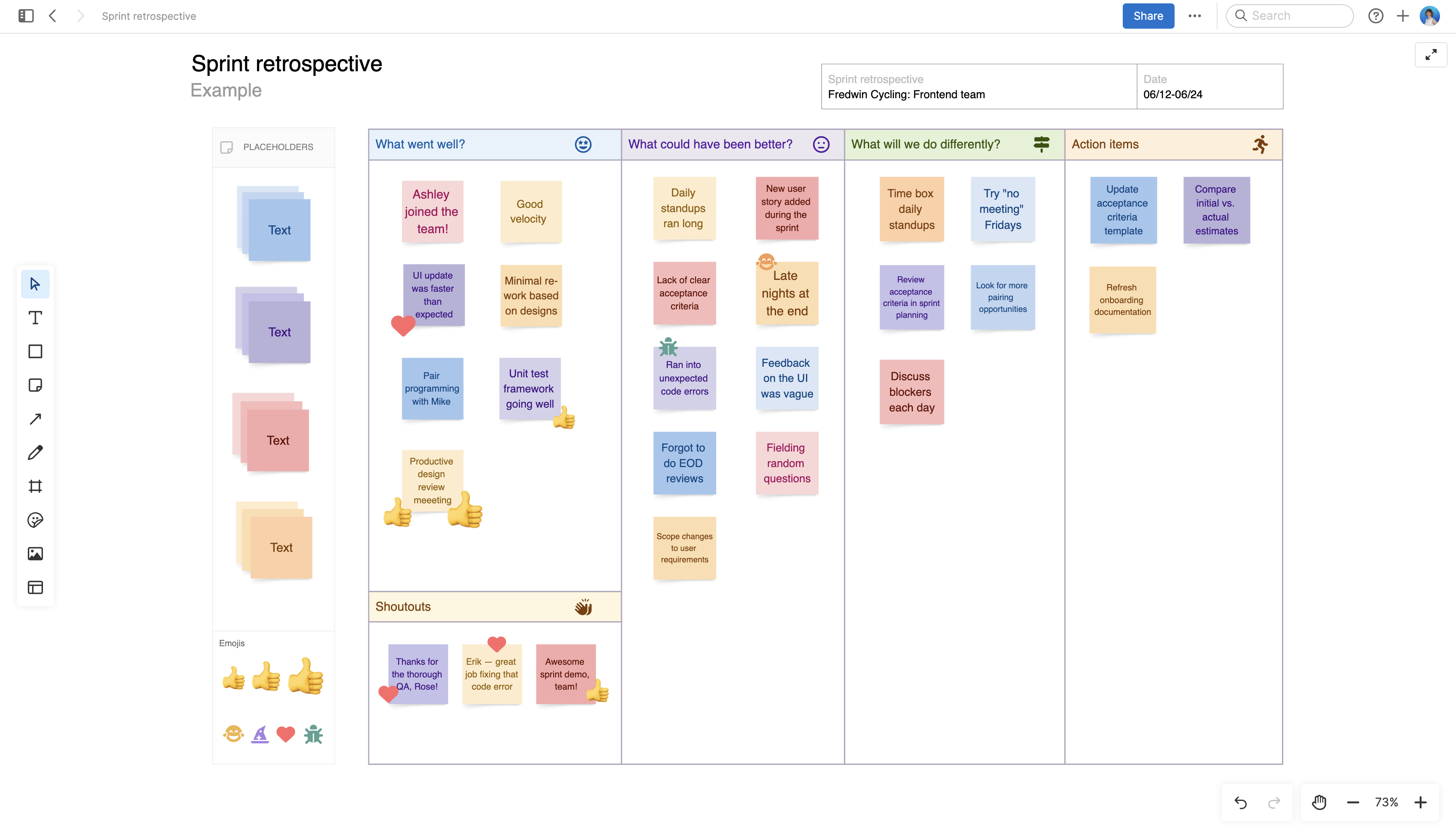
Here's what the retro experience actually looks like: you open Aha! Whiteboards, pick a sprint retrospective template, and get a canvas with columns for what went well, what didn't, and action items. Participants add sticky notes, vote on priorities, and discuss. The facilitator manages everything manually. There's no guided flow or automatic phase progression. No AI that groups related feedback either.
If your team uses Aha! Develop Advanced, you get a sprint retrospective report that pulls in burndown charts, velocity trends, and performance stats. That data sitting next to the whiteboard retro gives you more quantitative context than most standalone retro tools provide. A real advantage, assuming you're already paying for Develop.
The problem is cost. To get both the collaborative whiteboard retros and the sprint analytics, you need Develop Advanced ($18/user/month) plus Whiteboards Advanced ($9/user/month). That's $27/user/month before you've even touched Aha! Roadmaps. Kollabe gives you retros, planning poker, and standups for $29/month flat. Parabol starts free.
Pros
- Planning poker with Fibonacci, t-shirt, and custom decks directly on whiteboards
- Sprint retro report combines burndown, velocity, and performance data in one view
- 65+ integrations — Jira bi-directional sync, GitHub, Slack, Azure DevOps, Confluence
- ISO 27001 certified with SOC 2 Type II (via AWS) and GDPR compliance
Cons
- Not a retro tool — retrospectives are a minor feature in a product management platform
- No free plan, and the retro-capable tiers cost $27/user/month combined
- No guided facilitation, no anonymous card submission, no retro-specific AI features
- Card authorship is visible — only voting is anonymous, not feedback itself
Key Features
Whiteboard Retro Templates
Aha! Whiteboards includes around 100 templates total, with a handful specifically for retros: sprint retrospective, sailboat, starfish, Start/Stop/Continue, and SAFe PI retrospective. The templates are well-designed and give you a structured starting point on the infinite canvas.
Custom templates require the Whiteboards Advanced plan. On Essentials, you're limited to the built-in library. That's fine for most teams, but if you've developed a retro format your team likes, you'll want Advanced to save and reuse it.
The template count often cited is ~100, but that covers all whiteboard templates — strategy, product, design, architecture. The retro-specific selection is closer to 6-8 templates.
Anonymous Voting
Voting sessions in Aha! Whiteboards are anonymous while the session runs. Nobody, including the facilitator, can see who voted for what until the session ends. You get two styles: standard dot voting and Fist-to-Five confidence voting (popular in SAFe PI planning).
The timer feature is tied to voting. Set a time limit, and participants see a countdown at the top of the whiteboard. You can also leave sessions open for hours or days, which works for async participation.
What's not anonymous: the sticky notes themselves. Everyone can see who wrote what. This is the same limitation Miro and MURAL have. If your team needs fully anonymous feedback where nobody knows who said what, Parabol or EasyRetro handle that.
Sprint Retrospective Report (Develop Advanced)
This is where Aha! actually differentiates from the whiteboard-style retro tools. The sprint retro report in Aha! Develop Advanced combines:
- Burndown chart for the completed sprint
- Velocity trend across recent sprints
- Throughput and delivery risk metrics
- Cycle and lead time analysis
- Custom list of completed work
Having this data in front of the team during a retro grounds the conversation in what actually happened instead of what people remember happening. Most dedicated retro tools don't have this kind of quantitative sprint data baked in — you'd need to pull it from Jira or your sprint tool separately.
The sprint retro report is the strongest argument for running retros in Aha! — quantitative sprint data alongside qualitative feedback in one place.
Planning Poker
Aha! Whiteboards Advanced includes planning poker with Fibonacci numbers, t-shirt sizes, and custom voting decks. Estimates happen directly on whiteboard objects, and all votes are hidden until the facilitator reveals them.
It works well enough if your team is already on Aha! Whiteboards. But it's a whiteboard add-on, not a dedicated estimation tool. You won't get the ticket import and auto-sync-back-to-Jira workflow that Kollabe or GoRetro offer. Estimates live on the whiteboard — getting them into your sprint tool is a manual step.
Integrations
65+ integrations is a strong number. The highlights for retro-adjacent work:
- Jira: Bi-directional sync. Send features from Aha! to Jira, get updates back automatically.
- GitHub/GitLab: Push features to engineering, import issues.
- Slack: One-way. Activity streams to channels, create Aha! records from Slack messages. No interactive retro features in Slack.
- Azure DevOps: Send work, convert whiteboard objects to ADO work items.
- Confluence: Import content, share visual roadmaps.
Notable gaps: no Linear integration, no Trello two-way sync (import only). The Slack integration is notification-only, which is less useful than the interactive Slack integrations in Parabol or ScatterSpoke.
AI Features
Aha! has an AI assistant that works across the suite, but it's focused on product management tasks: drafting feature descriptions, synthesizing research, generating roadmap content. For whiteboards, the AI can create wireframes from text prompts.
None of that AI touches retrospectives. You won't get automatic grouping of similar feedback cards, retro summaries, or sentiment analysis on what the team wrote. Miro and MURAL both apply their AI to whiteboard content for clustering and summarization. Aha! hasn't done that yet.
Pricing
Aha! is a multi-product suite. Retro-relevant pricing:
- Aha! Whiteboards Essentials: $9/user/month (annual). Unlimited whiteboards, 100+ templates, real-time collaboration, guest sharing.
- Aha! Whiteboards Advanced: +$9/user/month add-on. Planning poker, audience voting, custom templates, Jira/ADO integration, SSO.
- Aha! Develop Essentials: $9/user/month (annual). Sprint planning, backlog, estimation, kanban/scrum.
- Aha! Develop Advanced: $18/user/month (annual). Sprint retro report, burndown/velocity, automation, SSO, Roadmaps integration.
- Aha! Roadmaps Premium: $59/user/month. The flagship product. Includes Whiteboards Essentials.
- Aha! Roadmaps Enterprise: $99/user/month. Unlimited free viewers, Develop integration.
No free plan. 30-day free trial only.
For a team that wants the full retro experience (collaborative boards + sprint analytics + planning poker), you're looking at Develop Advanced ($18) + Whiteboards Advanced add-on ($9) = $27/user/month. A 10-person team pays $270/month. For context, Parabol is free for up to 2 teams, EasyRetro is $38/month for unlimited teams, and Kollabe is $29/month flat.
The math only works if you're already buying Aha! for product management. In that case, the incremental cost for retro features is reasonable. As a standalone retro purchase, it's one of the most expensive options on this list.
Ease of Use
If you've used any whiteboard tool, the Aha! Whiteboards retro experience is familiar. Sticky notes, voting dots, drag-and-drop grouping. The canvas is clean and responsive.
The learning curve hits in a different place. Aha! is a big platform. New users who sign up expecting a retro tool will wade through roadmap workspaces, feature scoring, and product hierarchy settings before they find a whiteboard. It's disorienting if retros are all you came for.
There's also no facilitation guidance. The facilitator opens a template and runs the retro manually, deciding when to move from brainstorming to voting to discussion. Retrium walks teams through phases step by step. Parabol does it too. Aha! assumes you already know how to run a retro.
The Develop sprint retro report is straightforward once you find it, but it's gated behind the Advanced plan. Teams on Essentials don't see it at all.
Who Is It Best For?
Aha! makes sense for retros in one specific scenario: your team already uses Aha! for product management and you want to avoid adding another tool to the stack.
If that's you, the whiteboard retro templates plus the sprint retro report in Develop Advanced give you a reasonable retro experience without leaving the platform. Having sprint analytics right next to the qualitative feedback is useful context that standalone retro tools lack.
For everyone else, dedicated retro tools win. They cost less, they're easier to set up, and they have the things Aha! is missing: guided facilitation, true anonymous feedback, retro-specific AI.
Not a fit for:
- Teams that need true anonymous feedback throughout the entire retro
- Organizations shopping specifically for a retro tool
- Small teams or startups watching their budget
- Teams that want guided facilitation with phase automation
- Anyone who doesn't already use Aha! for something else
The Verdict
Aha! can run retrospectives the way a Swiss Army knife can open a bottle of wine. It works. The tool is there. But someone who actually wants to open wine reaches for a corkscrew.
The sprint retro report is the one feature that stands out. Having burndown charts and velocity data in front of the team during a retro is something most dedicated tools can't match. Planning poker in Whiteboards is solid. The integration list is deep.
Everything else points you elsewhere. No free plan. No guided facilitation. No anonymous feedback on cards. No retro-specific AI. Pricing that assumes you're buying a product management suite, not a retro tool. If Aha! is already in your tech stack, use the retro features and save yourself another subscription. If you're shopping for a retro tool, Parabol, EasyRetro, or Kollabe will get you there faster and cheaper.