

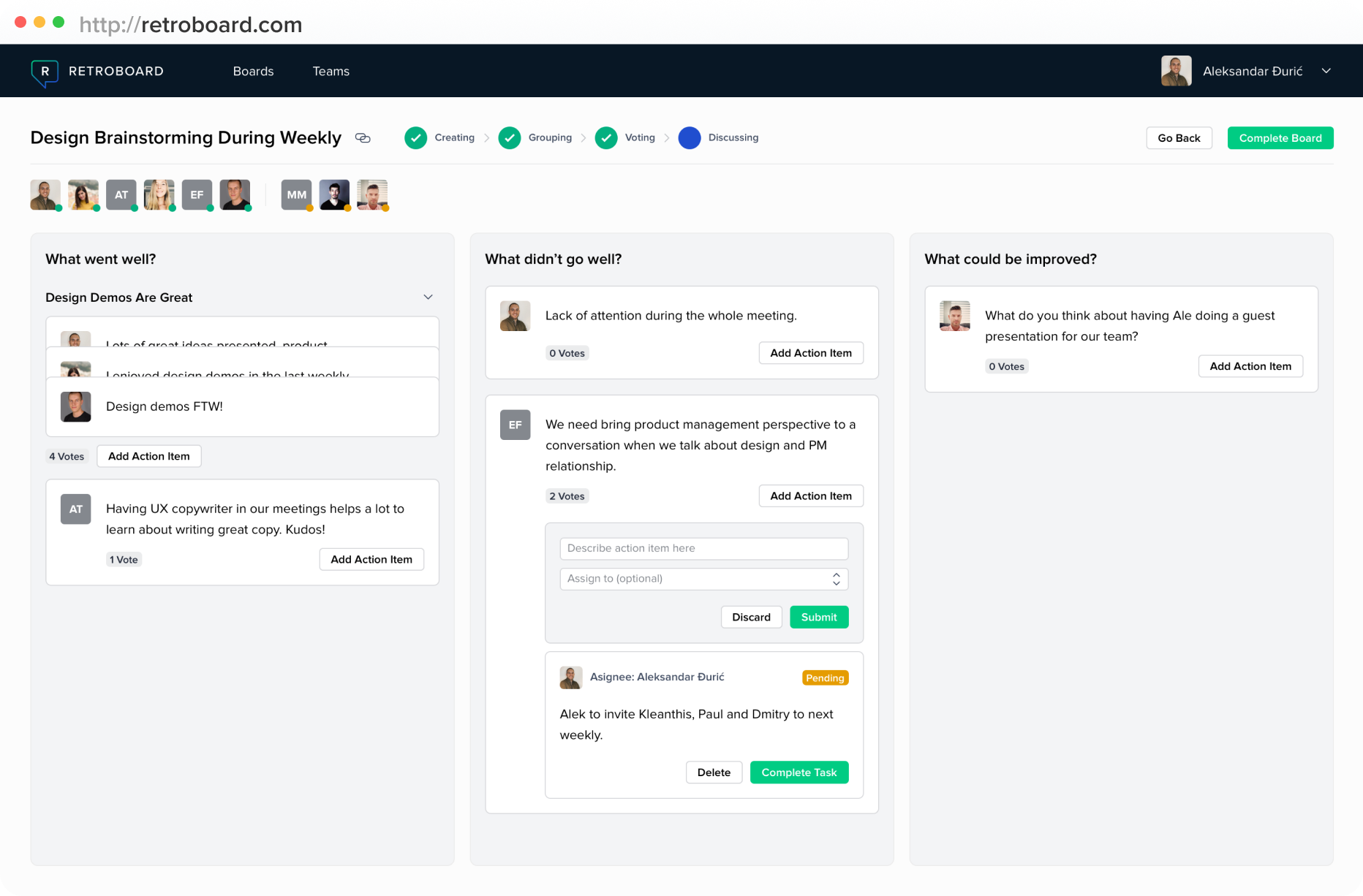
Overview
RetroBoard does one thing: it gives you a board with columns and cards. You open the site, create a board, share the link with your team, and start collecting feedback. No account creation, no onboarding wizard. Just a board.
That is genuinely the entire product.
In a market where every retrospective tool is racing to bolt on AI summaries, enterprise dashboards, Jira integrations, and analytics suites, RetroBoard goes the opposite direction. It is a digital version of sticky notes on a wall. You get columns, you get cards, you get upvotes, and you get a CSV export button. The developer built it on Bubble.io back in 2018 as a side project, and it does not appear to have changed much since.
It is completely free. No paid tiers, no premium features locked behind a paywall. If your team needs a retro board in the next thirty seconds and nobody wants to create an account anywhere, RetroBoard will get out of the way and let you do that.
The trade-off is that you are giving up basically everything else. You will not find templates, anonymous mode, or integrations with your project management tools here. There are no analytics and no facilitation controls. Action items you write down are disconnected from wherever your team actually tracks work. And because it runs on Bubble.io (a no-code platform), performance can get noticeably sluggish when multiple people are on the board at once.
Pros
- Completely free with no paid plans or upgrade pressure
- Simple and immediately accessible — zero learning curve
- No account required to create or join a retro
Cons
- No templates, no integrations, no AI, no anonymous mode
- Built on Bubble.io, which can feel sluggish under load
- No sign of active development — unclear if the tool is still maintained
- Minimal market presence and no community to speak of
Key Features
Basic Retro Board
A columnar board where participants add cards with their feedback. Click, type, submit. Other participants see updates in real-time.
You can use the columns however you want: "what went well," "what didn't," "action items." But there is no format picker and no guided flow. You are managing the structure yourself, which is fine if you have an experienced facilitator running the session. If your team is new to retros and nobody knows what comes next, the lack of guardrails will be felt.
Voting
Upvote cards to surface what matters most. That is the whole feature. It works.
CSV Export
Export your board as a CSV file. There is no Jira integration, no Slack notification, and no API. If you need data out of RetroBoard and into another system, you are copying it over manually.
Pricing
Free. The whole thing. No tiers, no upsells.
Completely free. No accounts needed. No paid tiers. If you need a retro board in the next 30 seconds, this is it.
This is RetroBoard's strongest argument for existing. When someone asks "can we run a retro right now without spending anything or creating any accounts?" — RetroBoard says yes. Neatro's free tier gives you more features, but caps you at 10 team members. RetroBoard has no such restriction.
The developer's original 2018 launch post mentioned paid plans with history tracking. Those either never materialized or were quietly dropped. Today the site shows no pricing page and no upgrade path of any kind.
Ease of Use
Hard to imagine a simpler tool. Open the site, make a board, share the link. Done.
The flip side is that facilitators get nothing. No timers, no private writing phase, no guided steps. You manage the entire retro flow yourself, whether that is verbally on a call or through chat. Seasoned scrum masters will not miss any of that. A team running their first retro might struggle without some kind of structure to lean on.
Built on Bubble.io, a no-code platform. Performance can get sluggish with more than a handful of people typing at once.
Worth mentioning: Bubble.io apps are not known for speed. For a five-person team doing a quick check-in, it will feel fine. Try loading it with fifteen people all typing at once and you may notice the difference compared to purpose-built tools like EasyRetro or Parabol.
Who Is It Best For?
RetroBoard fits a narrow set of situations:
- You need a free retro board right now with zero setup
- You are running an informal check-in and a full retro tool is overkill
- It is a one-off retro and you do not need historical data
- Your budget for retro tooling is zero
Outside of those cases, dedicated tools offer a lot more. Neatro has a free tier with 70+ templates and a guided 4-step workflow. Metro Retro gives you a visual canvas experience starting at $4/user/month. Retrium has guided facilitation at $39/month. Even Miro's free tier gives you three boards with far more functionality than what RetroBoard offers.
The Verdict
RetroBoard is the simplest retro tool that exists. Zero cost, zero friction, and almost zero features beyond a board and a vote button. For a quick, informal retro where the alternative is skipping the retro entirely, it gets you into a board faster than anything else.
But that is a low bar. Any team running retros more than occasionally will hit the limits almost immediately. There are no templates to keep formats fresh, no integrations to push action items into your actual backlog, and no way to track whether the team is improving over time. Use it when you need something free and instant. Move on once retros become a regular part of how your team works.