

Overview
Metro Retro is the retro tool that actually makes retrospectives fun. Where most tools in this space focus on structure, analytics, or facilitation workflows, Metro Retro bets on engagement. The thinking: if your team dreads retros, no amount of guided steps will fix that.
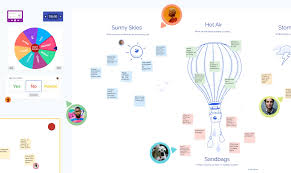
The platform is built around a canvas experience that feels more like a creative workshop than a meeting tool. Sticky notes, animated gestures, interactive gadgets, and digital hats for your cursor. Yes, hats. It sounds gimmicky until you watch a quiet teammate fire off confetti after someone shares a win. Those micro-interactions get people participating when more serious tools can't.
Founded in 2019 by Jamie Hanratty, Steve Whitfield, and Lisa Angel in London, Metro Retro grew to 250,000+ teams and over 2 million meetings — all organically, with zero advertising spend. It rebranded to Ludi in August 2025 (from the Latin word for "games"). The domain moved from metroretro.io to ludi.co, with redirects in place. The product is the same. You'll still see both names around the internet for a while.
Pros
- Fun, engaging canvas UI that makes retros feel less like a chore
- Broad use cases beyond retros — planning poker, workshops, icebreakers
- Large template library with 115+ options, all hand-illustrated
- Strong anonymous mode that permanently strips identity from contributions
- Affordable per-user pricing starting at $4/user/month (annual)
Cons
- No free plan — removed September 2024, only a 30-day trial now
- Jira is the only real integration — no Slack, Teams, Azure DevOps, or Linear
- No AI features, no analytics, no cross-retro trend tracking
- Recently rebranded to Ludi, causing some confusion in search and docs
- Per-user pricing adds up quickly for larger teams
Key Features
Canvas-Based Experience
Instead of the column-based board layout most retro tools use, Metro Retro gives you a free-form canvas. Teams place, move, and interact with sticky notes spatially. Anyone who's worked with a physical whiteboard gets it immediately.
The canvas handles multiple simultaneous users without lag. Zoom, pan, organize however you want. It lands somewhere between Miro's pure whiteboard flexibility and the structured layouts of tools like Retrium, with enough freedom to be creative but enough structure that retros don't wander off.
Gestures, Gadgets, and Hats
This is Metro Retro's personality. Animated gestures like thumbs up and confetti. Interactive gadgets including a spinner, buzzer, counter, and jukebox. Cursor hats.
These aren't decorative. They create social cues in a medium that typically has none. When someone shares something vulnerable and sees a wave of supportive reactions, that carries real weight. Silence doesn't. When energy drops, a silly hat or the spinner breaks the tension. The difference between a team that tolerates retros and one that shows up ready to talk.
115+ Templates
The template library spans retrospectives (~45), planning (~15), icebreakers (~15), estimation, futurespectives, product management, meetings/workshops, and check-out activities. All hand-illustrated, which fits the playful brand. You can also build from scratch and save custom templates to share within your team space.
Comparable to Neatro's 70+ and significantly more than Retrium or ScatterSpoke. The variety means you could run a different format every sprint for years without repeating.
Anonymous Mode
The "Hide Identities" feature goes further than most. It replaces avatars with question marks, strips author attribution from sticky notes, standardizes everyone's handwriting style, makes voting anonymous, and disables spotlight/follow. Once something is written or voted on while anonymous mode is active, it stays anonymous permanently. Even exports won't reveal who wrote what.
Anonymous mode permanently strips identity from contributions. Even exports won't reveal who wrote what. One of the strongest anonymity implementations in the category.
It's one of the better anonymous modes out there. Most tools just hide names but leave avatar colors or writing patterns that make people identifiable anyway.
Private Writing and Reveal
Everyone's contributions stay hidden until the facilitator reveals them, which prevents anchoring bias. You can reveal all at once or one sticky at a time. The one-by-one option is worth trying if your retros tend to rush through items. It forces the group to sit with each point before moving on.
Action Items
Action items are created directly from sticky notes using @ mentions or the toolbar. You can assign owners and set due dates. The platform has a dedicated Action Items dashboard where teams can track, edit, and batch-update actions. Email notifications go out for assigned, upcoming, and overdue items. Actions can be imported across boards so you can review them in future retros.
Not as deep as what Sprintlio offers for follow-through, but more than enough for most teams.
Voting
Dot voting on stickies, topics, index cards, and task cards. You set how many votes each person gets and whether they can stack multiple votes on one item. Multiple rounds are supported, and starting a new round locks the previous results. Results can be viewed ranked by individual sticky or grouped by topic.
Planning Poker
A Fibonacci estimation template with automated voting and assignment. Import Jira tickets to estimate directly on the board (Business plan). Tokens can also be used for T-shirt sizing. Not as full-featured as dedicated estimation tools, but it means one less subscription for teams that want retros and estimation in the same place.
Jira Integration (Business Plan Only)
Two-way integration: import Jira issues via OAuth 2.0 with JQL filters and bulk selection. Edit Jira fields inline on the board. Convert sticky notes into new Jira issues. Manual sync by default, with real-time two-way sync available if your Jira admin coordinates with Ludi support.
Only Jira issue IDs are stored permanently — full issue data is cached per session. That's a reasonable security choice.
Jira is the only integration. No Slack, no Teams, no Azure DevOps, no Linear, no Confluence. Slack and Teams have been "coming soon" since 2024.
The catch: Jira is the only integration. No Slack notifications, no Teams, no Azure DevOps, no Linear, no Confluence, no Trello. That's a real problem for teams whose workflow depends on those tools. The V2 announcement in 2024 listed Slack, Teams, and Confluence as "coming soon," but none have shipped as of early 2026.
Export Options
Export boards to CSV, JSON, HTML table, or PDF. CSV and JSON exports have configurable columns (content, color, author, timestamps, zone) and support anonymous export. Color data can export as names, hex, or RGBA. Comments export as additional columns.
Four export formats is more than most retro tools bother with. The anonymous export is a nice detail — useful if you want to share retro output with leadership without anyone worrying about attribution.
Pricing
Metro Retro removed its free plan in September 2024. You get a 30-day trial, then it's paid only.
Metro Retro killed its free plan in September 2024. That stung. The tool had been free for years and built its entire user base on that promise.
- Free trial: 30 days, no card required. Full access.
- Starter: $5/user/month ($4/user/month annual). Min 2 members. One team space, unlimited boards, facilitation tools, templates, action tracking.
- Business: $8/user/month ($6/user/month annual). Up to 200 members. Adds unlimited team spaces, Jira integration, SSO, 2 external collaborators per board, board history, priority support.
- Enterprise: Custom pricing. 100+ users. Adds SLAs, multi-year contracts, on-premises option, founder onboarding.
The $4-5/user/month starting price is competitive. A 10-person team on Starter pays $40-50/month, in the same range as Retrium at $39/team/month. But per-user pricing scales linearly. A 50-person department hits $200-250/month on Starter, and at that size Retrium's per-room model or Parabol's flat pricing works out cheaper.
Worth noting: Jira integration requires the Business plan at $6-8/user/month. That's the tier most teams will actually want, which puts real-world pricing higher than the headline number.
Ease of Use
The canvas approach has a slightly different learning curve than column-based tools. Most people adapt fast. The gestures and gadgets are the kind of thing people discover by poking around — learning through play works here.
The rebrand creates real friction in practice. Help articles reference Metro Retro in some spots and Ludi in others. Google results are mixed. Community discussions use both names. The docs have moved to docs.ludi.co but old links still redirect. It's a temporary mess, but if you're evaluating the tool right now, expect to deal with it.
Who Is It Best For?
Metro Retro works well for:
- Teams that find traditional retro tools dull and want something with energy
- Visual thinkers who prefer canvas-style work over rigid column boards
- Facilitators who use icebreakers and creative techniques regularly
- Small teams that want retros, planning poker, and workshops in one tool
Not the right fit if you need cross-retro analytics (ScatterSpoke does that), guided facilitation workflows (Retrium excels there), AI-powered insights (ScatterSpoke or Parabol), deep integrations beyond Jira, or a free option (RetroBoard is free forever).
The Verdict
In a category full of functional but forgettable tools, Metro Retro stands out on personality alone. The canvas, the gestures, the hats — they add up to something that feels different from every other retro board. And "makes retros enjoyable" is a legitimate feature when your team has been mailing it in for months.
But personality only goes so far. No AI features. No analytics. One integration. No free tier. These are real gaps, not nitpicks, and they limit who this tool makes sense for. If engagement is your main problem and your team is small enough that per-user pricing doesn't sting, Metro Retro delivers something competitors genuinely can't match. If you need data, integrations, or scale, look elsewhere.