

Overview
IdeaBoardz predates almost everything else in this directory. A handful of Thoughtworks engineers built it as a side project around 2010, and the homepage counter says teams have since posted over 36 million ideas across 3.4 million boards. The UI has barely changed in that time. Neither has the price: free, with no paid tier, no ads, and no catch beyond the obvious question of how long a hobby project stays online.
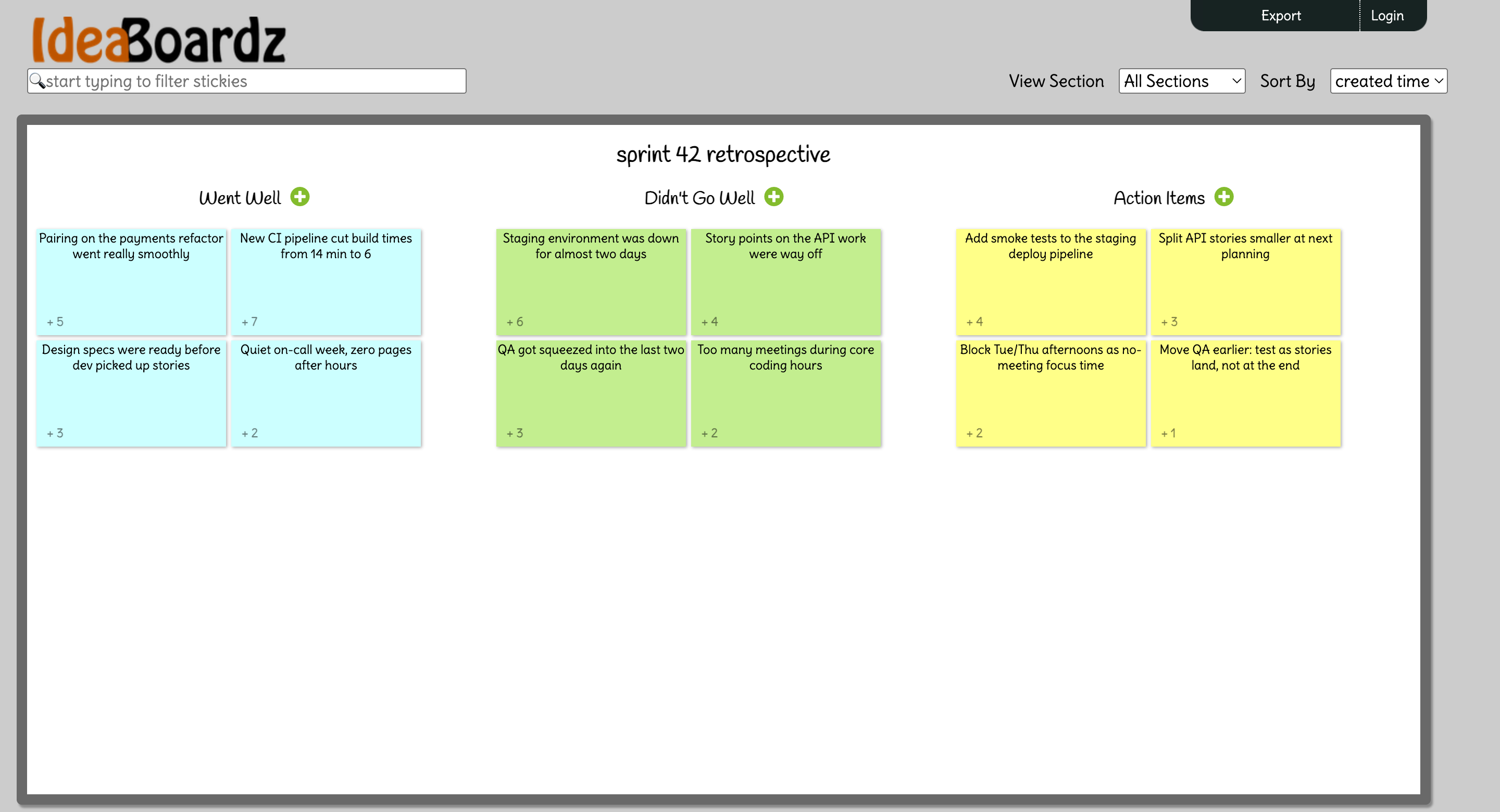
The model is radical simplicity. You create a board, pick a format (or name up to 10 custom sections), and share the URL. That's the entire onboarding. No accounts for participants, no workspace setup, no invite emails. People open the link and start adding stickies.
That makes IdeaBoardz one of the few genuinely async-first boards here. Because everything lives at a permanent URL with no session to start or end, teams post cards all week and then meet to discuss. Tools like EasyRetro do this too, but not for free at this level of unlimited.
Pros
- Genuinely 100% free: unlimited boards, no premium tier, no ads
- Participants join with a URL, no accounts or logins anywhere
- Anonymous by default, which encourages honest cards
- Boards persist indefinitely, so async collection over a week just works
Cons
- No access control at all: anyone with the URL can view and edit your board
- No timer, no facilitation flow, no action item tracking, no integrations
- Effectively unmaintained, with a UI unchanged since the early 2010s
- No grouping or merging of similar cards, which gets messy past 30 stickies
Key Features
Boards and Formats
Five presets cover the classics: Retrospective (a Starfish layout), Brainstorm, Pros & Cons, To-Dos, and Six Thinking Hats. Or skip the presets and create one to ten sections with your own titles, which handles Start/Stop/Continue, 4Ls, Mad/Sad/Glad, and most other column formats.
There is no template gallery beyond that, and no way to save a custom layout for reuse. Running the same custom format every sprint means recreating it every sprint.
Dot Voting
The facilitator sets how many votes each person gets, and cards can be sorted by vote count when it is time to discuss. You can also disable voting entirely or hide the counts while voting is open.
For a free tool, the voting controls are surprisingly reasonable. They are also the only facilitation controls you get.
Anonymous by Default
Since nobody logs in, cards carry no names unless you turn on the board's "show card's author" option. For teams where honest feedback needs cover, that default matters, and it is more anonymity than FigJam manages with its reversible author toggle.
The flip side: there is no identity at all. No way to know who wrote what, who voted, or who even saw the board.
Export
Boards export to PDF and Excel. That is how action items leave IdeaBoardz, because nothing inside it tracks them. Whatever your team commits to has to live in Jira, a doc, or someone's memory.
Boards are public-by-URL with no access control. Anyone who has, guesses, or is forwarded the link can read and edit your board. Do not run retros that touch personnel issues, security incidents, or anything confidential here.
Pricing
Free. Not freemium: free.
Unlimited boards, unlimited sections, unlimited participants, voting, and export, at $0 with no paid tier to upsell you into. The FAQ's pricing section is one sentence long.
The honest caveat is sustainability. There is no revenue model, no company behind it, and no visible development since the terms of service were last touched in 2020. The site works today and has worked for fifteen years, but you are relying on a few generous engineers continuing to pay the hosting bill. Teams that want a free tier with a business attached should look at Parabol, which is free for two teams and actively developed.
Ease of Use
This is the easiest tool in the directory to get a team into. Create a board, paste the URL in your team channel, done. Nobody installs anything, nobody creates an account, and the interface is so minimal that no one asks how it works.
Facilitating a live session is where the friction shows. There is no timer, so you use your phone. There is no reveal/conceal flow beyond a blunt "hide cards" toggle. There is no grouping, so duplicate cards about the same problem sit side by side, and busy boards turn into a wall of text past 30 stickies. Sorting by votes is your only organizing tool.
Mobile is rough. The site technically loads on a phone but was never designed for it, and the old Android app is deprecated.
Who Is It Best For?
IdeaBoardz fits well for:
- Teams with zero budget who still want async input collection and dot voting
- Occasional retros, workshops, or one-off brainstorms that do not justify a subscription
- Communities of practice or classroom settings where nobody can be asked to register
- Collecting anonymous input over a week before a live discussion elsewhere
Look elsewhere if you need:
- Any privacy guarantees. Boards are editable by anyone with the link
- Facilitation mechanics: timers, phases, grouping. Kollabe or TeamRetro cover these
- Action items that survive the meeting. Nothing here follows up
- A tool your compliance team will approve. There is no SOC 2, no SSO, and no stated GDPR posture
The Verdict
Judged as what it is, a free community tool from 2010, IdeaBoardz holds up better than it has any right to. The core loop of add stickies, dot vote, discuss, export still works, and the no-login async model remains genuinely useful. It earns its place ahead of barebones options like RetroBoard because the voting controls and five formats give facilitators a little more to work with.
Judged as a retrospective tool for a working agile team in 2026, it is hard to recommend as your main tool. The missing timer, missing action items, missing integrations, and wide-open board access are not quirks, they are the product. Every modern alternative fixes all four.
Keep IdeaBoardz in your back pocket for the situations it was built for: no budget, no setup time, no sensitive content. For everything else, our best retrospective tools guide has options that will follow through after the meeting ends.