

Quick Verdict
The two big whiteboards, and the most common head-to-head we hear from design-adjacent teams. Both run a perfectly good retro. Miro runs a more complete one.
Miro's private mode keeps stickies hidden until the facilitator reveals them, which is as close to anonymity as a whiteboard gets. Its Estimation app handles planning poker natively. Sticky notes convert to cards with owners and due dates that sync two-way with Jira and Azure DevOps. FigJam has none of those: author names are a reversible toggle, estimation needs third-party widgets, and action items are just stickies someone has to remember.
FigJam counters on cost and feel. A $3/month Collab seat undercuts Miro's $8 Starter seat, the interface is friendlier to non-designers than Miro's toolbar sprawl, and if your company pays for Figma you already own it. For a team that wants a fun, competent retro and nothing more, that is a hard argument to beat.

Feature Comparison
Start with what is identical: infinite canvas, retro templates in the hundreds (Miro claims 300+ official plus 7,000+ community; FigJam's library is similarly deep), dot voting, timers, emoji reactions, comments, and AI that groups stickies. A team could run the same Start/Stop/Continue retro in either and barely notice the difference.
The differences show up at the edges of the meeting.
Miro's private mode is the big one. Participants write stickies that stay hidden until the facilitator reveals them, which kills anchoring bias and gets closer to honest input. FigJam hides votes during a voting session but never hides the stickies themselves, and its author-name toggle is reversible rather than anonymous. Neither offers the true anonymity of a dedicated retro tool like Kollabe or Parabol, but Miro gets meaningfully closer.
Follow-through tilts the same way. Miro converts stickies to cards with owners and due dates, then syncs them to Jira or Azure DevOps in real time. Add the native Estimation app for planning poker and Miro covers two ceremonies FigJam only reaches through Community widgets.
FigJam's real advantage is not a feature, it's a bundle. Since Figma's 2025 seat restructure, FigJam ships with every Figma seat on every plan. If your org already pays for Figma Design, adding retros costs zero dollars and zero procurement meetings.
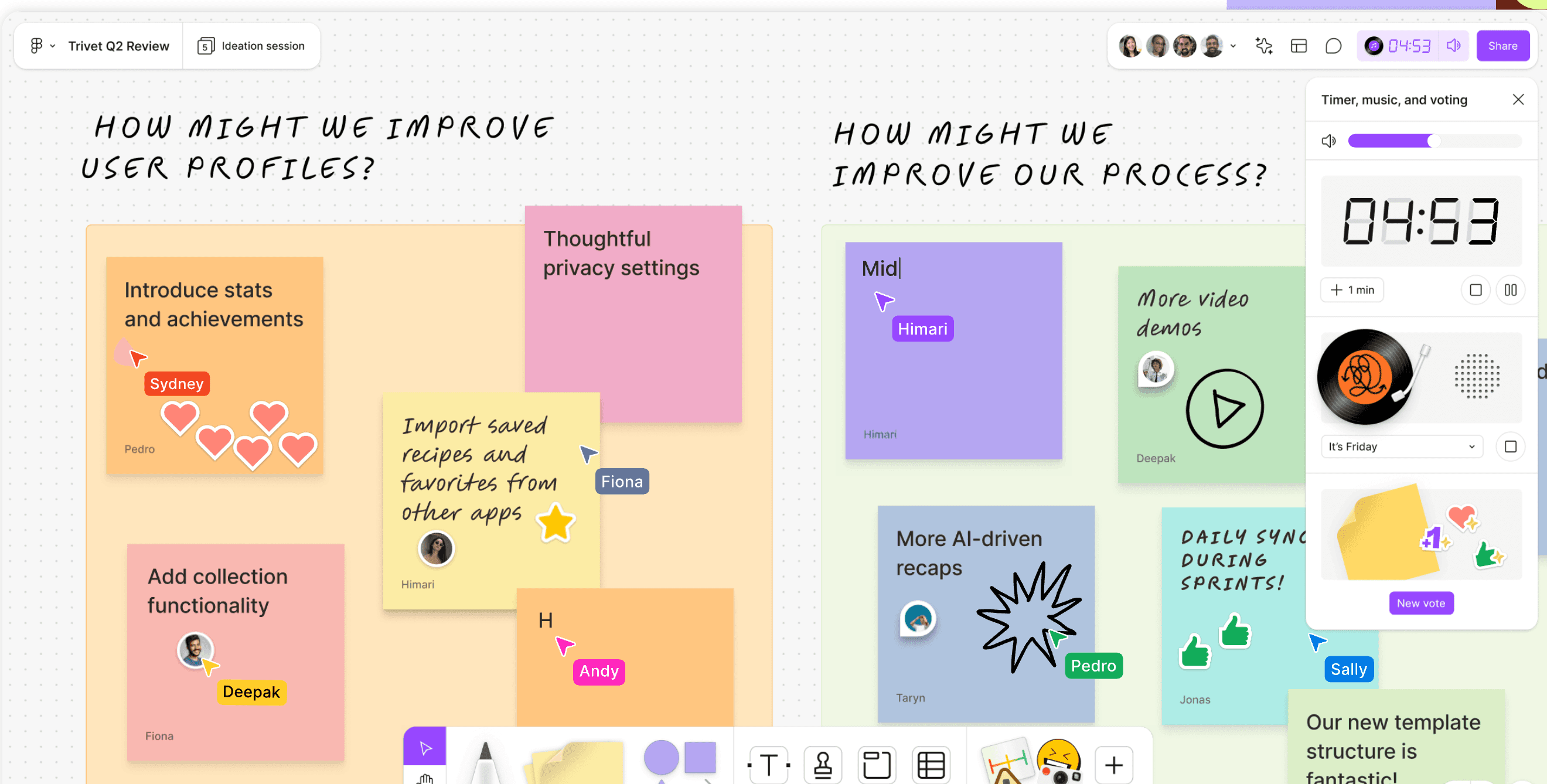
FigJam still owns the vibe category: stamps, animated emotes, washi tape, cursor chat, and a built-in music player that Miro has no answer for. If your retros die of low energy, those toys are worth more than they sound.
Pricing Comparison
Both are per-seat products with limited free tiers — 3 boards on Miro, 3 files on FigJam. Neither free plan survives a quarter of biweekly retros.

FigJam
Collab seat, annual — bundled with all Figma plans
- Cheapest paid whiteboard seat around
- Free with existing Figma seats
- 150 AI credits/day on free tier
- SSO from Organization plan ($5/seat)

Miro
Starter plan, annual billing
- Unlimited boards from Starter
- Native Estimation app included
- Two-way Jira/Azure sync on Business ($16)
- 160+ integrations
A ten-person team pays $30/month for FigJam Collab seats against $80/month for Miro Starter. That gap widens on Miro's Business plan ($16/member), which is where the two-way Jira and Azure DevOps sync and SSO actually live. Real-world Miro deployments for engineering teams usually mean Business, so the honest comparison is closer to $30 versus $160 for that ten-person team.
Whether Miro's extra mechanics are worth five times the price depends entirely on whether you use them. If action-item sync and estimation stay switched off, you are paying for a bigger canvas you do not need.
Ease of Use
FigJam is the easier tool, and it is not particularly close. The toolbar is small, the metaphors are obvious, and non-designers stop asking questions after one session. Miro's power comes with visual noise: more menus, more modes, more features to trip over. New participants regularly need a minute of "where is the sticky note button" orientation.
Facilitation is manual in both. Neither offers the phased, guided flow of a TeamRetro or Retrium, so the facilitator drives everything. Miro's presentation mode and "bring everyone to me" give a bit more crowd control on big boards; FigJam's spotlight does the same job with less ceremony.
One practical note: anyone with edit access in Miro can start timers and voting, which occasionally turns retros chaotic. FigJam gates voting sessions to paid-team facilitators, which is annoying for budgets and helpful for order.
Integrations
Miro wins this category on volume and depth. 160+ marketplace apps, two-way sync with Jira, Azure DevOps, Linear (beta), Trello, Asana, Monday.com, plus Slack, Teams, Zoom, and Google Workspace hooks. If a tool exists in your stack, Miro probably talks to it.
FigJam's set is smaller but covers the essentials for a retro: Jira and GitHub widgets that create and link issues, an Asana widget, Confluence embedding, and official Slack and Teams apps for notifications. No Azure DevOps, no Linear, no Trello.
The tiebreaker for many teams: Figma itself. FigJam boards live next to your design files, share the same accounts and permissions, and embed design frames natively. Miro embeds Figma files too, but as a guest, not a sibling.
AI and Automation
Miro's AI is broader. Sticky clustering by keyword, author, and sentiment, board summaries via Catch-up, translation across 18 languages, and 2025's Sidekicks and AI Flows for multi-step canvas automation. Sentiment-aware clustering is genuinely useful in a retro — it separates the frustrated cards from the neutral ones before you even read them.
FigJam AI covers the retro basics: sort stickies into themed sections, summarize a selection into takeaways, and generate a board from a prompt. It does less than Miro's suite but the two retro-relevant actions work well.
Both meter AI with credits, and both free tiers are tight (Miro: 10 credits/month per team; FigJam: 150/day). Heavy AI use pushes you up a plan on either.
Who Should Choose Which?
Choose FigJam if…
- Your org already pays for Figma — FigJam is included
- You want the friendliest whiteboard for non-designers
- $3/seat beats every comparable paid tool
- Stamps, emotes, and music keep remote retros lively
- Your tracker is Jira or GitHub, covered by widgets
Choose Miro if…
- Private mode for hidden-until-reveal brainstorming
- Native Estimation app covers planning poker
- Action items become cards with two-way Jira/Azure sync
- Sentiment-aware AI clustering and 160+ integrations
- EU/US data residency and deeper enterprise controls
Final Recommendation
As retro tools, Miro is the more complete whiteboard and keeps its place at the top of our rankings. Private mode, native estimation, synced action items, and sentiment-aware AI close most of the gaps that make general-purpose canvases weak for retrospectives. If the whiteboard is going to be your team's system for agile ceremonies, Miro is the safer bet.
But price the decision honestly. FigJam delivers 80% of the retro experience at a third to a fifth of the seat cost, and at exactly zero cost for the large population of teams whose companies already buy Figma. For them, choosing Miro means paying twice for a canvas.
Design-led orgs: start with FigJam and see if you ever hit its walls. Engineering orgs that want ceremonies wired into Jira: Miro, on the Business plan. And if neither whiteboard's manual facilitation appeals, a purpose-built tool from our best retrospective tools guide will structure the meeting for you.